

Skip to content
  • Home
  • Company
    • Overview
    • Technology
    • Key Highlights
    • Mile Stones
    • Careers
  • Solution
    • ERP
    • Dedicated Developers
    • Digital Transformation
  • Service

    List One

    1

    List One

    1

    List One

    1

    List One

    1

    List One

    1

    ERP Solutions

    ERP SME

    Business Management

    ERP Retail

    POS & Inventory

    ERP Services

    Project Management

    ERP Garage

    Workshop System

    List One

    1

    List One

    1

    List One

    1

    List One

    1

    List One

    1

    ERP Real Estate

    Property Management

    ERP Typing Center

    Document Tracking

    ERP Tailoring

    Order Management

    ERP Production

    Manufacturing ERP

    List One

    1

    List One

    1

    List One

    1

    List One

    1

    List One

    1

    ERP Solutions

    OrderByMe Retail

    Smart POS

    OrderByMe Restaurant

    Digital Ordering

    Kiosk OrderByMe

    Self Ordering System

    List One

    1

    List One

    1

    List One

    1

    List One

    1

    List One

    1

    ERP Solutions

    Self Ordering System

    Customer Management

    HR & Payroll

    Employee Management

    ERP Solutions

    ERP SME

    Business Management

    ERP Retail

    POS & Inventory

    ERP Services

    Project Management

    ERP Garage

    Workshop System

    ERP Real Estate

    Property Management

    ERP Typing Center

    Document Tracking

    OrderByMe Solutions

    OrderByMe Retail

    Smart POS

    OrderByMe Restaurant

    Digital Ordering

    Kiosk OrderByMe

    Self Ordering System

    ERP Tailoring

    Order Management

    ERP Production

    Manufacturing ERP

    ERP Construction

    Project ERP

    Business System

    CRM

    Customer Management

    HR & Payroll

    Employee Management

    ERP Solutions

    ERP SME

    Business Management

    ERP Retail

    POS & Inventory

    ERP Services

    Project Management

    OrderByMe Solutions

    OrderByMe Retail

    Smart POS

    OrderByMe Restaurant

    Digital Ordering

    Kiosk OrderByMe

    Self Ordering System

    ERP Tailoring

    Order Management

    ERP Production

    Manufacturing ERP

    ERP Construction

    Project ERP

    Business System

    CRM

    Customer Management

    HR & Payroll

    Employee Management

  • Indusrties
    • Construction
    • Healthcare
    • Insurance
    • Ecommerce
    • Service Businesses
    • Retail
  • Resources
    • Contact
    • Blog
    • Documentation
Get Quoatation
  • Home
  • Company
    • Overview
    • Technology
    • Key Highlights
    • Mile Stones
    • Careers
  • Solution
    • ERP
    • Dedicated Developers
    • Digital Transformation
  • Service

    List One

    1

    List One

    1

    List One

    1

    List One

    1

    List One

    1

    ERP Solutions

    ERP SME

    Business Management

    ERP Retail

    POS & Inventory

    ERP Services

    Project Management

    ERP Garage

    Workshop System

    List One

    1

    List One

    1

    List One

    1

    List One

    1

    List One

    1

    ERP Real Estate

    Property Management

    ERP Typing Center

    Document Tracking

    ERP Tailoring

    Order Management

    ERP Production

    Manufacturing ERP

    List One

    1

    List One

    1

    List One

    1

    List One

    1

    List One

    1

    ERP Solutions

    OrderByMe Retail

    Smart POS

    OrderByMe Restaurant

    Digital Ordering

    Kiosk OrderByMe

    Self Ordering System

    List One

    1

    List One

    1

    List One

    1

    List One

    1

    List One

    1

    ERP Solutions

    Self Ordering System

    Customer Management

    HR & Payroll

    Employee Management

    ERP Solutions

    ERP SME

    Business Management

    ERP Retail

    POS & Inventory

    ERP Services

    Project Management

    ERP Garage

    Workshop System

    ERP Real Estate

    Property Management

    ERP Typing Center

    Document Tracking

    OrderByMe Solutions

    OrderByMe Retail

    Smart POS

    OrderByMe Restaurant

    Digital Ordering

    Kiosk OrderByMe

    Self Ordering System

    ERP Tailoring

    Order Management

    ERP Production

    Manufacturing ERP

    ERP Construction

    Project ERP

    Business System

    CRM

    Customer Management

    HR & Payroll

    Employee Management

    ERP Solutions

    ERP SME

    Business Management

    ERP Retail

    POS & Inventory

    ERP Services

    Project Management

    OrderByMe Solutions

    OrderByMe Retail

    Smart POS

    OrderByMe Restaurant

    Digital Ordering

    Kiosk OrderByMe

    Self Ordering System

    ERP Tailoring

    Order Management

    ERP Production

    Manufacturing ERP

    ERP Construction

    Project ERP

    Business System

    CRM

    Customer Management

    HR & Payroll

    Employee Management

  • Indusrties
    • Construction
    • Healthcare
    • Insurance
    • Ecommerce
    • Service Businesses
    • Retail
  • Resources
    • Contact
    • Blog
    • Documentation
Get Quoatation
  • Home
  • Company
    • Overview
    • Technology
    • Key Highlights
    • Mile Stones
    • Careers
  • Solution
    • ERP
    • Dedicated Developers
    • Digital Transformation
  • Service

    List One

    1

    List One

    1

    List One

    1

    List One

    1

    List One

    1

    ERP Solutions

    ERP SME

    Business Management

    ERP Retail

    POS & Inventory

    ERP Services

    Project Management

    ERP Garage

    Workshop System

    List One

    1

    List One

    1

    List One

    1

    List One

    1

    List One

    1

    ERP Real Estate

    Property Management

    ERP Typing Center

    Document Tracking

    ERP Tailoring

    Order Management

    ERP Production

    Manufacturing ERP

    List One

    1

    List One

    1

    List One

    1

    List One

    1

    List One

    1

    ERP Solutions

    OrderByMe Retail

    Smart POS

    OrderByMe Restaurant

    Digital Ordering

    Kiosk OrderByMe

    Self Ordering System

    List One

    1

    List One

    1

    List One

    1

    List One

    1

    List One

    1

    ERP Solutions

    Self Ordering System

    Customer Management

    HR & Payroll

    Employee Management

    ERP Solutions

    ERP SME

    Business Management

    ERP Retail

    POS & Inventory

    ERP Services

    Project Management

    ERP Garage

    Workshop System

    ERP Real Estate

    Property Management

    ERP Typing Center

    Document Tracking

    OrderByMe Solutions

    OrderByMe Retail

    Smart POS

    OrderByMe Restaurant

    Digital Ordering

    Kiosk OrderByMe

    Self Ordering System

    ERP Tailoring

    Order Management

    ERP Production

    Manufacturing ERP

    ERP Construction

    Project ERP

    Business System

    CRM

    Customer Management

    HR & Payroll

    Employee Management

    ERP Solutions

    ERP SME

    Business Management

    ERP Retail

    POS & Inventory

    ERP Services

    Project Management

    OrderByMe Solutions

    OrderByMe Retail

    Smart POS

    OrderByMe Restaurant

    Digital Ordering

    Kiosk OrderByMe

    Self Ordering System

    ERP Tailoring

    Order Management

    ERP Production

    Manufacturing ERP

    ERP Construction

    Project ERP

    Business System

    CRM

    Customer Management

    HR & Payroll

    Employee Management

  • Indusrties
    • Construction
    • Healthcare
    • Insurance
    • Ecommerce
    • Service Businesses
    • Retail
  • Resources
    • Contact
    • Blog
    • Documentation
Get Quoatation

Emeron ERP

20
  • Manufacturing in Emeron ERP
  • Manufacturing
  • CRM
  • Stock
  • Stock Masters
  • Accounting
  • Buying
  • Selling
  • Assets
  • Reports
  • Users and Permissions
  • Data Management
  • Setting Up
  • The Project Champion
  • Introduction
  • Why should businesses use an ERP?
  • Do I Need Emeron ERP?
  • Open Source
  • Concepts and Terms
  • Getting Started with Emeron ERP

Emeron HR

14
  • Recruitment
  • Training
  • Employee Lifecycle
  • Fleet Management
  • Salary
  • Employee Tax and Benefits
  • Overtime
  • Flexible Benefits
  • Payroll Correction
  • Arrears
  • Human Resource Setup
  • Reports
  • Emeron HR
  • Why should businesses use an ERP?

CRM

8
  • Mobile App Installation
  • Customization
  • Integrations
  • Other Features
  • Maters
  • Settings
  • Introduction
  • Emeron HR

Accounting

13
  • Purchase Invoice
  • 0verview
  • Opening and Closing
  • Accounting Masters
  • Taxes
  • Fiscal Year
  • Opening Balance in Accounts
  • Setting Up Taxes
  • Chart Of Accounts
  • Tax Category
  • Item Tax Template
  • Tax Withholding Category
  • Reports
  • Home
  • Docs
  • CRM
  • Introduction
View Categories

Introduction

What is Frappe CRM? #

Frappe CRM is a simple, affordable, open-source CRM tool designed for modern sales teams with unlimited users. Frappe CRM is crafted for providing a great user experience, packed with features for core CRM activities helping you build strong customer relationships while keeping things clean and organised.

Why Frappe CRM? #

Many existing CRMs are either too complex, overly generic, or locked behind steep pricing models that hinder accessibility and flexibility. Frappe CRM was designed to bridge this gap, offering a tool that empowers businesses to manage their customer relationships seamlessly while being easy to adapt to specific workflows. Built on the Frappe framework, it prioritizes usability, extensibility, and affordability, making it an ideal choice for growing teams and organizations looking for a CRM that aligns with their unique processes.

Key Features #
  • Views: Tailor your view to display essential information by defining filters, sorting, and columns.
    • Pinned: Pin frequently used views for instant access.
    • Public: You can access pre-configured views with commonly used filters and data.
    • Saved: For easy access later, save your customized view.
  • Email Communication: Send and receive emails directly from the Lead/Deal Page.
  • Email Templates: Create and use email templates for faster communication.
  • Comments: Add comments to leads and deals to keep track of the conversation.
  • Notifications: Get notified when someone mentions you in a comment.
  • Service Level Agreement: Set SLA for leads and deals and get notified when the SLA is breached.
  • Assignment Rule: Automatically assign leads and deals to users based on the criteria.
  • Tasks: Create tasks for leads and deals.
  • Notes: Add notes to leads and deals.
  • Call Logs: See the call logs with call details and recordings.
Integrations #
  • Twilio: Integrate Twilio to make and receive calls from the CRM.
  • Exotel: Use Exotel to make & receive call via mobile phone and log it on CRM.
  • WhatsApp: WhatsApp your customer right from the lead/deal page.
  • Emeron ERP: Integrate with Emeron ERP to extend the CRM capabilities to include invoicing, accounting, and more.
Under the Hood #
  • Frappe Framework: A full-stack web application framework.
  • Frappe UI: A Vue-based UI library, to provide a modern user interface.
Installation #

Frappe CRM can be installed in multiple ways, depending on your requirements. You can either use Frappe Cloud for a fully managed experience or install CRM on your own server.

The following sections explain each installation method in detail.

Managed Hosting (Frappe Cloud) #

You can install Frappe CRM with a single click using Frappe Cloud, the managed hosting platform for Frappe applications.

  • Sign up here to get started
  • Your CRM instance will be ready in a few minutes

If you already have a Frappe Cloud site, you can install Frappe CRM directly from the Frappe Cloud Marketplace.

Tip

Recommendation: We strongly recommend trying Frappe Cloud before opting for self-hosting.

Self Hosting #
Production Setup #

Follow these steps to set up Frappe CRM in production:

Step 1: Download the easy install script

wget https://frappe.io/easy-install.py

Step 2: Run the deployment command

python3 ./easy-install.py deploy \
    --project=crm_prod_setup \
    --email=email.example.com \
    --image=ghcr.io/frappe/crm \
    --version=stable \
    --app=crm \
    --sitename subdomain.domain.tld

Replace the following parameters with your values:

  • your_email.example.com: Your email address
  • subdomain.domain.tld: Your domain name where CRM will be hosted

The script will set up a production-ready instance of Frappe CRM with all the necessary configurations in about 5 minutes.

Note

If hosting on a public server, make sure your DNS A record points to your server’s IP and if hosting locally, map your domain to 127.0.0.1 in your /etc/hosts file to avoid 404 Page Not Found error.

Development Setup #
Docker Setup #

To run CRM using Docker, ensure the following are installed:

  • Docker
  • Docker Compose
  • Git

Refer to Docker documentation. After that, follow the steps below:

Step 1: Create a directory and download the required files

mkdir frappe-crm
cd frappe-crm

# Download the docker-compose file
wget -O docker-compose.yml https://raw.githubusercontent.com/frappe/crm/develop/docker/docker-compose.yml

# Download the setup script
wget -O init.sh https://raw.githubusercontent.com/frappe/crm/develop/docker/init.sh

Step 2: Start the containers

docker compose up -d

Step 3: Access the application.

The site http://crm.localhost:8000/crm should now be available. The default credentials are:

Username: Administrator
Password: admin

Tip

Security note: Recommend changing the default password after login.

Local Setup (Bench) #
  1. Setup Bench.
  2. In the frappe-bench directory, run bench start and keep it running.
  3. Open a new terminal session and cd into frappe-bench directory and run following commands:
$ bench get-app crm
$ bench new-site sitename.localhost --install-app crm
$ bench browse sitename.localhost --user Administrator
  1. Access the crm page at sitename.localhost:8000/crm in your web browser.

For Frontend Development

  1. Open a new terminal session and cd into frappe-bench/apps/crm, and run the following commands:
yarn install
yarn dev

  1. Now, you can access the site on the Vite dev server at http://sitename.localhost:8080

Setting Up #

This guide will walk you through the setup process for your Frappe CRM after installation. You’ll learn how to configure essential elements, import data, and access your CRM portal.

Navigating your workspace #

Once you’ve set up your CRM, you’ll land on the Frappe CRM workspace. This central hub provides easy access to all the essential setup tools:
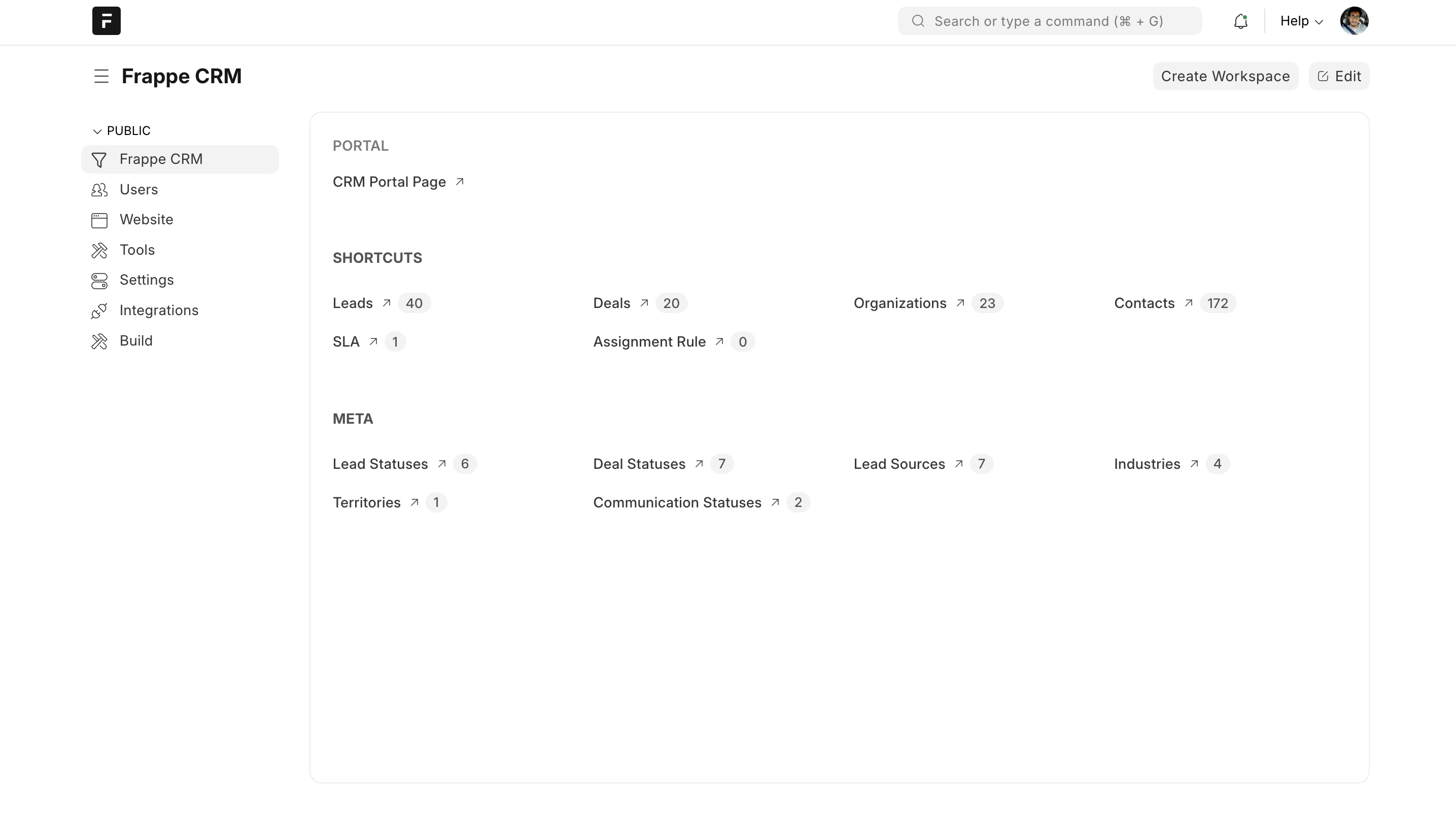
  • Master Data: Manage core CRM elements like Leads, Deals, Organizations, and Contacts. Create and customize these masters to fit your specific sales process.
  • SLA and Assignment Rules: Define service level agreements (SLAs) for timely lead and deal follow-up. Set up assignment rules to automatically assign leads and deals to the appropriate sales representatives.
  • Dependent Meta: Configure additional details related to your masters, such as Lead Statuses, Deal Statuses, and Lead Sources. These help categorize and track progress through your sales pipeline.
Data population #

There are two ways to populate your CRM with data:

  • Manual Entry: Manually add data for each master record directly within the system.
  • Data Import: Utilize the framework’s data import feature to efficiently import data from Excel or CSV files. This saves time and ensures accuracy.
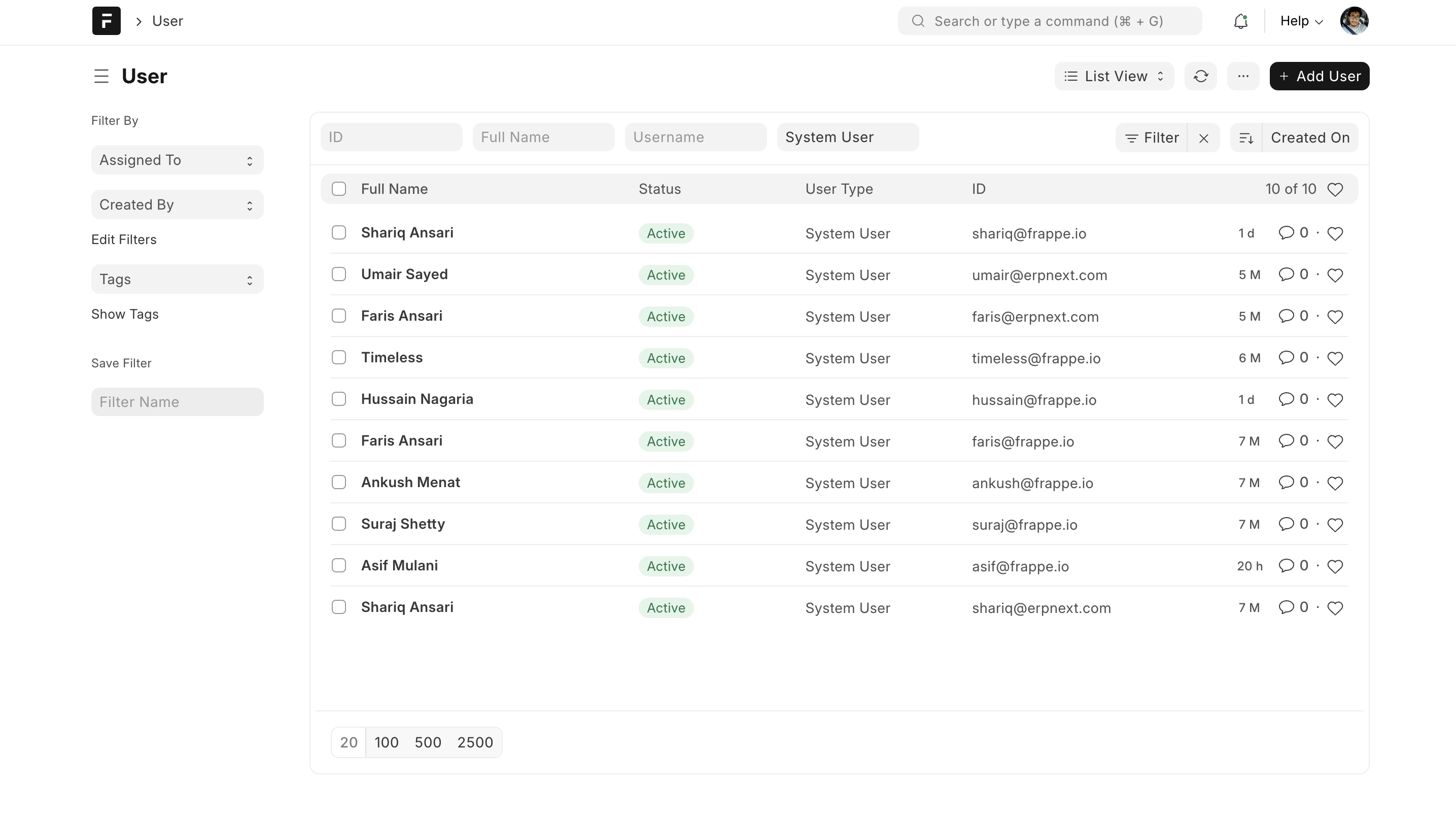
Adding users #

Don’t forget to create user accounts from the User Master section. This grants access to your CRM to team members who will be using the system.
Accessing your CRM portal #

The “CRM Portal Page” link provides access to your agent/salesperson-facing portal. Here, agents/salespersons can work on their leads & deals, creating a seamless sales experience.

Start your sales journey #

With your Frappe CRM set up, you’re now ready to manage leads, track deals, and collaborate with your team to achieve your sales goals.

Still stuck? How can we help?

How can we help?

SettingsEmeron HR

Powered by BetterDocs

Table of Contents
  • What is Frappe CRM?
  • Why Frappe CRM?
  • Key Features
  • Integrations
  • Under the Hood
  • Installation
  • Managed Hosting (Frappe Cloud)
  • Self Hosting
    • Production Setup
  • Development Setup
    • Docker Setup
    • Local Setup (Bench)
  • Setting Up
    • Navigating your workspace
    • Data population
    • Adding users
    • Accessing your CRM portal
      • Start your sales journey

Get smarter with tech! Join our newsletter for tips, trends, and solutions that save you time and money.

At Emeron Infospace, we design and deliver future‑ready digital solutions that simplify operations, accelerate growth, and create measurable impact for businesses across the GCC.

Company
  • Home
  • About
  • Services
  • Contact
Our Products
  • ERP SME
  • ERP Retail
  • ERP Services
  • ERP Garage
  • ERP Realestate
  • ERP Typing Center
  • Tailoring
  • OrderByMe Retail
Contact Us
  • Qatar
  • info@emeron.io
  • +971 55 635 1717
Facebook Twitter Youtube
  • Copyright © 2026 Emeron Infospace

Get smarter with tech! Join our newsletter for tips, trends, and solutions that save you time and money.

At Emeron Solutions, we design and deliver future‑ready digital solutions that simplify operations, accelerate growth, and create measurable impact for businesses across the GCC.

Quick Links

  • Home
  • Company
  • Services
  • Contact
  • Documentation

Services

  • ERP SME
  • ERP Retail
  • ERP Services
  • ERP Garage
  • ERP Realestate
  • ERP Typing Center
  • Tailoring
  • OrderByMe Retail
  • OrderByMe Restaurants
  • Kiosk OrderMe
  • ERP Production
  • ERP Construction
Phone

+974 70696100

Email

info@emeronsolutions.com

Address

Street 205, Building 84, Zone 56, Post box 22382 Doha

Copyright©2026 Emeron Solutions. All Rights Reserved.