
Skip to content
  • Home
  • Company
    • Overview
    • Technology
    • Key Highlights
    • Mile Stones
    • Careers
  • Service

    List One

    1

    List One

    1

    List One

    1

    List One

    1

    List One

    1

    ERP Solutions

    ERP SME

    Business Management

    ERP Retail

    POS & Inventory

    ERP Services

    Project Management

    ERP Garage

    Workshop System

    List One

    1

    List One

    1

    List One

    1

    List One

    1

    List One

    1

    ERP Real Estate

    Property Management

    ERP Typing Center

    Document Tracking

    ERP Tailoring

    Order Management

    ERP Production

    Manufacturing ERP

    List One

    1

    List One

    1

    List One

    1

    List One

    1

    List One

    1

    ERP Solutions

    OrderByMe Retail

    Smart POS

    OrderByMe Restaurant

    Digital Ordering

    Kiosk OrderByMe

    Self Ordering System

    List One

    1

    List One

    1

    List One

    1

    List One

    1

    List One

    1

    ERP Solutions

    Self Ordering System

    Customer Management

    HR & Payroll

    Employee Management

    ERP Solutions

    ERP SME

    Business Management

    ERP Retail

    POS & Inventory

    ERP Services

    Project Management

    ERP Garage

    Workshop System

    ERP Real Estate

    Property Management

    ERP Typing Center

    Document Tracking

    OrderByMe Solutions

    OrderByMe Retail

    Smart POS

    OrderByMe Restaurant

    Digital Ordering

    Kiosk OrderByMe

    Self Ordering System

    ERP Tailoring

    Order Management

    ERP Production

    Manufacturing ERP

    ERP Construction

    Project ERP

    Business System

    CRM

    Customer Management

    HR & Payroll

    Employee Management

    ERP Solutions

    ERP SME

    Business Management

    ERP Retail

    POS & Inventory

    ERP Services

    Project Management

    OrderByMe Solutions

    OrderByMe Retail

    Smart POS

    OrderByMe Restaurant

    Digital Ordering

    Kiosk OrderByMe

    Self Ordering System

    ERP Tailoring

    Order Management

    ERP Production

    Manufacturing ERP

    ERP Construction

    Project ERP

    Business System

    CRM

    Customer Management

    HR & Payroll

    Employee Management

  • Indusrties
    • Construction
    • Healthcare
    • Insurance
    • Ecommerce
    • Service Businesses
    • Retail
  • Contact
  • Resources
    • Blog
    • Documentation
Get Quoatation
  • Home
  • Company
    • Overview
    • Technology
    • Key Highlights
    • Mile Stones
    • Careers
  • Service

    List One

    1

    List One

    1

    List One

    1

    List One

    1

    List One

    1

    ERP Solutions

    ERP SME

    Business Management

    ERP Retail

    POS & Inventory

    ERP Services

    Project Management

    ERP Garage

    Workshop System

    List One

    1

    List One

    1

    List One

    1

    List One

    1

    List One

    1

    ERP Real Estate

    Property Management

    ERP Typing Center

    Document Tracking

    ERP Tailoring

    Order Management

    ERP Production

    Manufacturing ERP

    List One

    1

    List One

    1

    List One

    1

    List One

    1

    List One

    1

    ERP Solutions

    OrderByMe Retail

    Smart POS

    OrderByMe Restaurant

    Digital Ordering

    Kiosk OrderByMe

    Self Ordering System

    List One

    1

    List One

    1

    List One

    1

    List One

    1

    List One

    1

    ERP Solutions

    Self Ordering System

    Customer Management

    HR & Payroll

    Employee Management

    ERP Solutions

    ERP SME

    Business Management

    ERP Retail

    POS & Inventory

    ERP Services

    Project Management

    ERP Garage

    Workshop System

    ERP Real Estate

    Property Management

    ERP Typing Center

    Document Tracking

    OrderByMe Solutions

    OrderByMe Retail

    Smart POS

    OrderByMe Restaurant

    Digital Ordering

    Kiosk OrderByMe

    Self Ordering System

    ERP Tailoring

    Order Management

    ERP Production

    Manufacturing ERP

    ERP Construction

    Project ERP

    Business System

    CRM

    Customer Management

    HR & Payroll

    Employee Management

    ERP Solutions

    ERP SME

    Business Management

    ERP Retail

    POS & Inventory

    ERP Services

    Project Management

    OrderByMe Solutions

    OrderByMe Retail

    Smart POS

    OrderByMe Restaurant

    Digital Ordering

    Kiosk OrderByMe

    Self Ordering System

    ERP Tailoring

    Order Management

    ERP Production

    Manufacturing ERP

    ERP Construction

    Project ERP

    Business System

    CRM

    Customer Management

    HR & Payroll

    Employee Management

  • Indusrties
    • Construction
    • Healthcare
    • Insurance
    • Ecommerce
    • Service Businesses
    • Retail
  • Contact
  • Resources
    • Blog
    • Documentation
Get Quoatation

How can we help you?

Emeron ERP

20
  • Manufacturing in Emeron ERP
  • Manufacturing
  • CRM
  • Stock
  • Stock Masters
  • Accounting
  • Buying
  • Selling
  • Assets
  • Reports
  • Users and Permissions
  • Data Management
  • Setting Up
  • The Project Champion
  • Introduction
  • Why should businesses use an ERP?
  • Do I Need Emeron ERP?
  • Open Source
  • Concepts and Terms
  • Getting Started with Emeron ERP

Emeron HR

14
  • Recruitment
  • Training
  • Employee Lifecycle
  • Fleet Management
  • Salary
  • Employee Tax and Benefits
  • Overtime
  • Flexible Benefits
  • Payroll Correction
  • Arrears
  • Human Resource Setup
  • Reports
  • Emeron HR
  • Why should businesses use an ERP?

CRM

8
  • Mobile App Installation
  • Customization
  • Integrations
  • Other Features
  • Maters
  • Settings
  • Introduction
  • Emeron HR

Accounting

13
  • Purchase Invoice
  • 0verview
  • Opening and Closing
  • Accounting Masters
  • Taxes
  • Fiscal Year
  • Opening Balance in Accounts
  • Setting Up Taxes
  • Chart Of Accounts
  • Tax Category
  • Item Tax Template
  • Tax Withholding Category
  • Reports
  • Home
  • Docs
  • Emeron HR
  • Flexible Benefits
View Categories

Flexible Benefits

Employee Benefits in HRMS #

Flexible benefit plans allow employees to avail the benefits they want or need from a package of programs offered by an employer. They may include health insurance, pension plans, telephone expenses, etc.

To set Flexible Benefits in Emeron HR, follow the following steps:

Types of Benefits #

Once Is Flexible Benefit is enabled for a salary component, user can choose how to pay it out based on following scenarios:

  1. Accrue and payout at end of payroll period
    • The benefit amount accrues each payroll cycle and is fully paid out in the final cycle.
  2. Accrue per cycle, pay only on claim
    • The benefit accrues each cycle but is paid only when the employee submits an Employee Benefit Claim.
    • Payout is processed via Additional Salary.
    • Optional: Any unclaimed accrued balance can be auto-paid in the final cycle by enabling Payout Unclaimed Amount in Final Payroll Cycle.
  3. Allow claim up to the full period limit
    • The employee can claim the entire annual benefit in one go. No accruals are created.

Note: If Depends on Payment Days is enabled for a component, the monthly entitlement will be adjusted accordingly.

Assigning Employee Benefits to Employees #
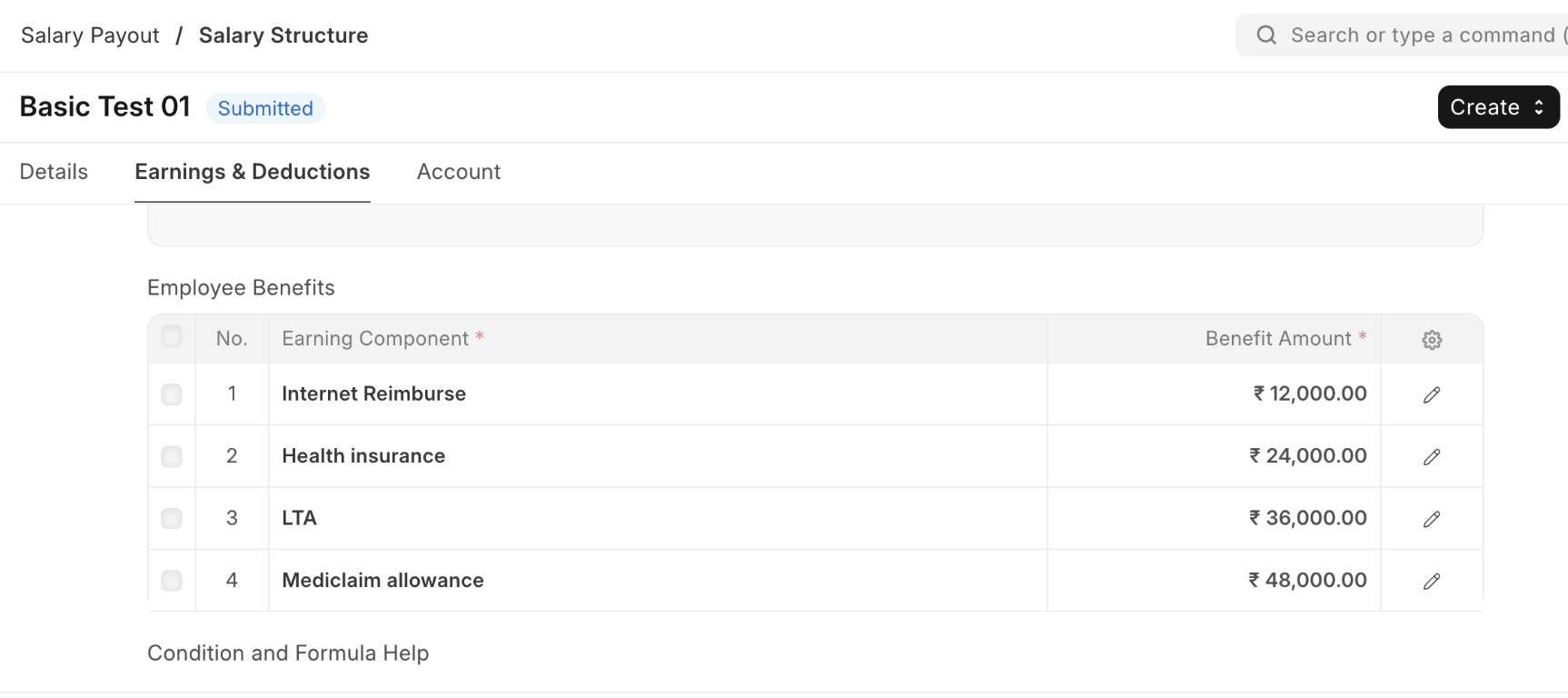
  • Configure employee benefits and their yearly amount in the Salary Structure. This acts as the template for employee benefits.
  • When a Salary Structure is assigned to an employee, these details are copied into the Salary Structure Assignment and can be edited further if required.
  • The final list and amounts in the Salary Structure Assignment are what the system considers.
#

Employee Benefit Application #
  • Employees can opt for the benefits they want from those assigned in their Salary Structure Assignment.
  • If no Benefit Application exists, the system falls back to the Salary Structure Assignment.
  • To make a Benefit Application mandatory, enable Mandatory Benefit Application in Payroll Settings.

Screenshot 2025-09-18 at 3 43 12 PM


Employee Benefit Ledger #
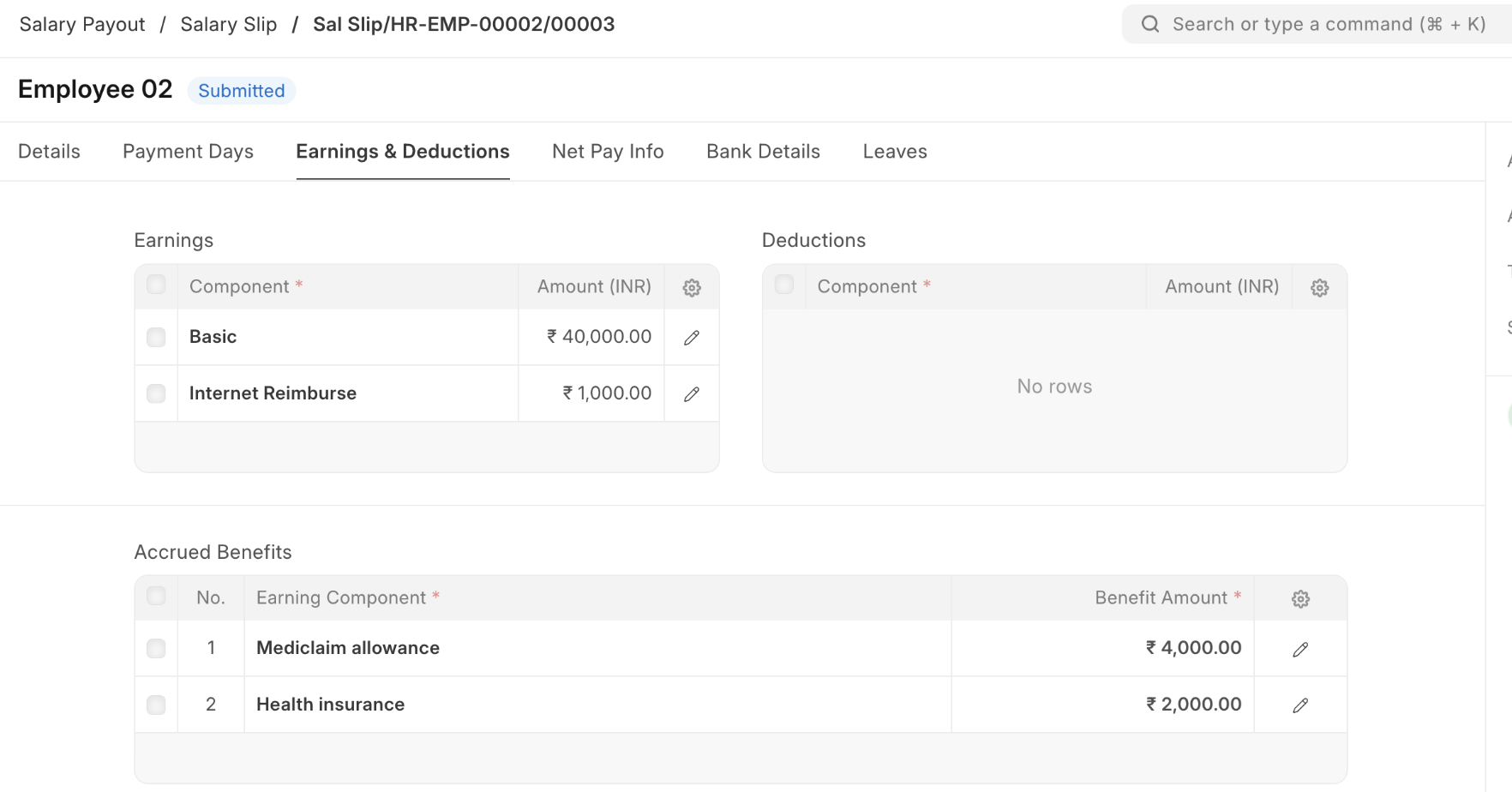
  • In the Salary Slip:
    • Accrued Benefits appear in the Accrued Benefits table.
    • Payouts appear as Earnings.
  • After salary is processed, a Benefit Ledger Entry is created for every accrual and payout to keep track of balances.
Employee Benefit ClaimClaims can be submitted only for these payout types: #
  • Accrue per cycle, pay only on claim
    • Claim limit = Total accrued so far + Current month’s entitlement
  • Allow claim up to the full period limit
    • Claim limit = Total assigned amount
Accrual Component in Salary Component #

A new checkbox Accrual Component is available in the Salary Component doctype.

Example use case:

  • HR wants to record a Loyalty Bonus equal to 5% of basic salary every month and pay it out after 10 months.
  • Create a Salary Component Loyalty Bonus, enable Accrual Component, and add it to the Salary Structure with a formula.
  • This accrual will:
    • Show in the salary slip as Accrued Earnings.
    • Not be included in gross pay or accounting entries.
    • Create an Employee Benefit Ledger entry for tracking.
  • At the end of 10 months, the employer can create an Additional Salary for the accrued amount, which will then flow into gross pay, accounting, and tax calculations.
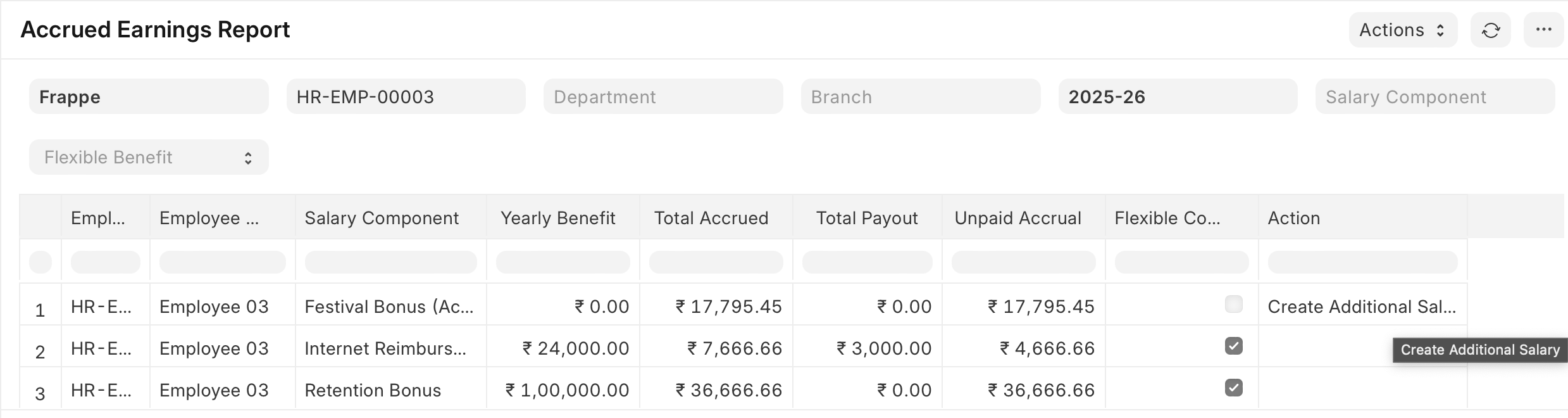
Accrued Earnings Report #

A report to track total accruals and payouts.

  • For standard accruals, users can create an Additional Salary for pending payouts directly.
  • For flexible benefits, payouts must be done via an Employee Benefit Claim.
Still stuck? How can we help?

How can we help?

OvertimePayroll Correction

Powered by BetterDocs

Table of Contents
  • Employee Benefits in HRMS
    • Types of Benefits
    • Assigning Employee Benefits to Employees
    • Employee Benefit Application
    • Employee Benefit Ledger
    • Employee Benefit ClaimClaims can be submitted only for these payout types:
    • Accrual Component in Salary Component
    • Accrued Earnings Report

Get smarter with tech! Join our newsletter for tips, trends, and solutions that save you time and money.

At Emeron Infospace, we design and deliver future‑ready digital solutions that simplify operations, accelerate growth, and create measurable impact for businesses across the GCC.

Company
  • Home
  • About
  • Services
  • Contact
Our Products
  • ERP SME
  • ERP Retail
  • ERP Services
  • ERP Garage
  • ERP Realestate
  • ERP Typing Center
  • Tailoring
  • OrderByMe Retail
Contact Us
  • Qatar
  • info@emeron.io
  • +971 55 635 1717
Facebook Twitter Youtube
  • Copyright © 2026 Emeron Infospace

Get smarter with tech! Join our newsletter for tips, trends, and solutions that save you time and money.

At Emeron Solutions, we design and deliver future‑ready digital solutions that simplify operations, accelerate growth, and create measurable impact for businesses across the GCC.

Quick Links

  • Home
  • Company
  • Services
  • Contact
  • Documentation

Services

  • ERP SME
  • ERP Retail
  • ERP Services
  • ERP Garage
  • ERP Realestate
  • ERP Typing Center
  • Tailoring
  • OrderByMe Retail
  • OrderByMe Restaurants
  • Kiosk OrderMe
  • ERP Production
  • ERP Construction
Phone

+974 70696100

Email

info@emeronsolutions.com

Address

Street 205, Building 84, Zone 56, Post box 22382 Doha

Copyright©2026 Emeron Solutions. All Rights Reserved.