
Skip to content
  • Home
  • Company
    • Overview
    • Technology
    • Key Highlights
    • Mile Stones
    • Careers
  • Service

    List One

    1

    List One

    1

    List One

    1

    List One

    1

    List One

    1

    ERP Solutions

    ERP SME

    Business Management

    ERP Retail

    POS & Inventory

    ERP Services

    Project Management

    ERP Garage

    Workshop System

    List One

    1

    List One

    1

    List One

    1

    List One

    1

    List One

    1

    ERP Real Estate

    Property Management

    ERP Typing Center

    Document Tracking

    ERP Tailoring

    Order Management

    ERP Production

    Manufacturing ERP

    List One

    1

    List One

    1

    List One

    1

    List One

    1

    List One

    1

    ERP Solutions

    OrderByMe Retail

    Smart POS

    OrderByMe Restaurant

    Digital Ordering

    Kiosk OrderByMe

    Self Ordering System

    List One

    1

    List One

    1

    List One

    1

    List One

    1

    List One

    1

    ERP Solutions

    Self Ordering System

    Customer Management

    HR & Payroll

    Employee Management

    ERP Solutions

    ERP SME

    Business Management

    ERP Retail

    POS & Inventory

    ERP Services

    Project Management

    ERP Garage

    Workshop System

    ERP Real Estate

    Property Management

    ERP Typing Center

    Document Tracking

    OrderByMe Solutions

    OrderByMe Retail

    Smart POS

    OrderByMe Restaurant

    Digital Ordering

    Kiosk OrderByMe

    Self Ordering System

    ERP Tailoring

    Order Management

    ERP Production

    Manufacturing ERP

    ERP Construction

    Project ERP

    Business System

    CRM

    Customer Management

    HR & Payroll

    Employee Management

    ERP Solutions

    ERP SME

    Business Management

    ERP Retail

    POS & Inventory

    ERP Services

    Project Management

    OrderByMe Solutions

    OrderByMe Retail

    Smart POS

    OrderByMe Restaurant

    Digital Ordering

    Kiosk OrderByMe

    Self Ordering System

    ERP Tailoring

    Order Management

    ERP Production

    Manufacturing ERP

    ERP Construction

    Project ERP

    Business System

    CRM

    Customer Management

    HR & Payroll

    Employee Management

  • Indusrties
    • Construction
    • Healthcare
    • Insurance
    • Ecommerce
    • Service Businesses
    • Retail
  • Contact
  • Resources
    • Blog
    • Documentation
Get Quoatation
  • Home
  • Company
    • Overview
    • Technology
    • Key Highlights
    • Mile Stones
    • Careers
  • Service

    List One

    1

    List One

    1

    List One

    1

    List One

    1

    List One

    1

    ERP Solutions

    ERP SME

    Business Management

    ERP Retail

    POS & Inventory

    ERP Services

    Project Management

    ERP Garage

    Workshop System

    List One

    1

    List One

    1

    List One

    1

    List One

    1

    List One

    1

    ERP Real Estate

    Property Management

    ERP Typing Center

    Document Tracking

    ERP Tailoring

    Order Management

    ERP Production

    Manufacturing ERP

    List One

    1

    List One

    1

    List One

    1

    List One

    1

    List One

    1

    ERP Solutions

    OrderByMe Retail

    Smart POS

    OrderByMe Restaurant

    Digital Ordering

    Kiosk OrderByMe

    Self Ordering System

    List One

    1

    List One

    1

    List One

    1

    List One

    1

    List One

    1

    ERP Solutions

    Self Ordering System

    Customer Management

    HR & Payroll

    Employee Management

    ERP Solutions

    ERP SME

    Business Management

    ERP Retail

    POS & Inventory

    ERP Services

    Project Management

    ERP Garage

    Workshop System

    ERP Real Estate

    Property Management

    ERP Typing Center

    Document Tracking

    OrderByMe Solutions

    OrderByMe Retail

    Smart POS

    OrderByMe Restaurant

    Digital Ordering

    Kiosk OrderByMe

    Self Ordering System

    ERP Tailoring

    Order Management

    ERP Production

    Manufacturing ERP

    ERP Construction

    Project ERP

    Business System

    CRM

    Customer Management

    HR & Payroll

    Employee Management

    ERP Solutions

    ERP SME

    Business Management

    ERP Retail

    POS & Inventory

    ERP Services

    Project Management

    OrderByMe Solutions

    OrderByMe Retail

    Smart POS

    OrderByMe Restaurant

    Digital Ordering

    Kiosk OrderByMe

    Self Ordering System

    ERP Tailoring

    Order Management

    ERP Production

    Manufacturing ERP

    ERP Construction

    Project ERP

    Business System

    CRM

    Customer Management

    HR & Payroll

    Employee Management

  • Indusrties
    • Construction
    • Healthcare
    • Insurance
    • Ecommerce
    • Service Businesses
    • Retail
  • Contact
  • Resources
    • Blog
    • Documentation
Get Quoatation

How can we help you?

Emeron ERP

20
  • Manufacturing in Emeron ERP
  • Manufacturing
  • CRM
  • Stock
  • Stock Masters
  • Accounting
  • Buying
  • Selling
  • Assets
  • Reports
  • Users and Permissions
  • Data Management
  • Setting Up
  • The Project Champion
  • Introduction
  • Why should businesses use an ERP?
  • Do I Need Emeron ERP?
  • Open Source
  • Concepts and Terms
  • Getting Started with Emeron ERP

Emeron HR

14
  • Recruitment
  • Training
  • Employee Lifecycle
  • Fleet Management
  • Salary
  • Employee Tax and Benefits
  • Overtime
  • Flexible Benefits
  • Payroll Correction
  • Arrears
  • Human Resource Setup
  • Reports
  • Emeron HR
  • Why should businesses use an ERP?

CRM

8
  • Mobile App Installation
  • Customization
  • Integrations
  • Other Features
  • Maters
  • Settings
  • Introduction
  • Emeron HR

Accounting

13
  • Purchase Invoice
  • 0verview
  • Opening and Closing
  • Accounting Masters
  • Taxes
  • Fiscal Year
  • Opening Balance in Accounts
  • Setting Up Taxes
  • Chart Of Accounts
  • Tax Category
  • Item Tax Template
  • Tax Withholding Category
  • Reports
  • Home
  • Docs
  • Emeron HR
  • Training
View Categories

Training

Training Program defines programs designed for training employees or other individuals in specific skills.

In Emeron HR, you can create a Training Program and schedule Training Events under it.

To access Training Program, go to:

Home > Human Resources > Training > Training Program

1. How to create a Training Program #
  1. Go to Training Program list, click on New.
  2. Enter the Training Program name.
  3. Enter the Trainer Name, Trainer Email and Contact Number.
  4. Select the Supplier n(optional) in case an outside vendor/expert was called to conduct the training.
  5. Additionally, you can also write a short description of the Training Program in the Description box (optional).
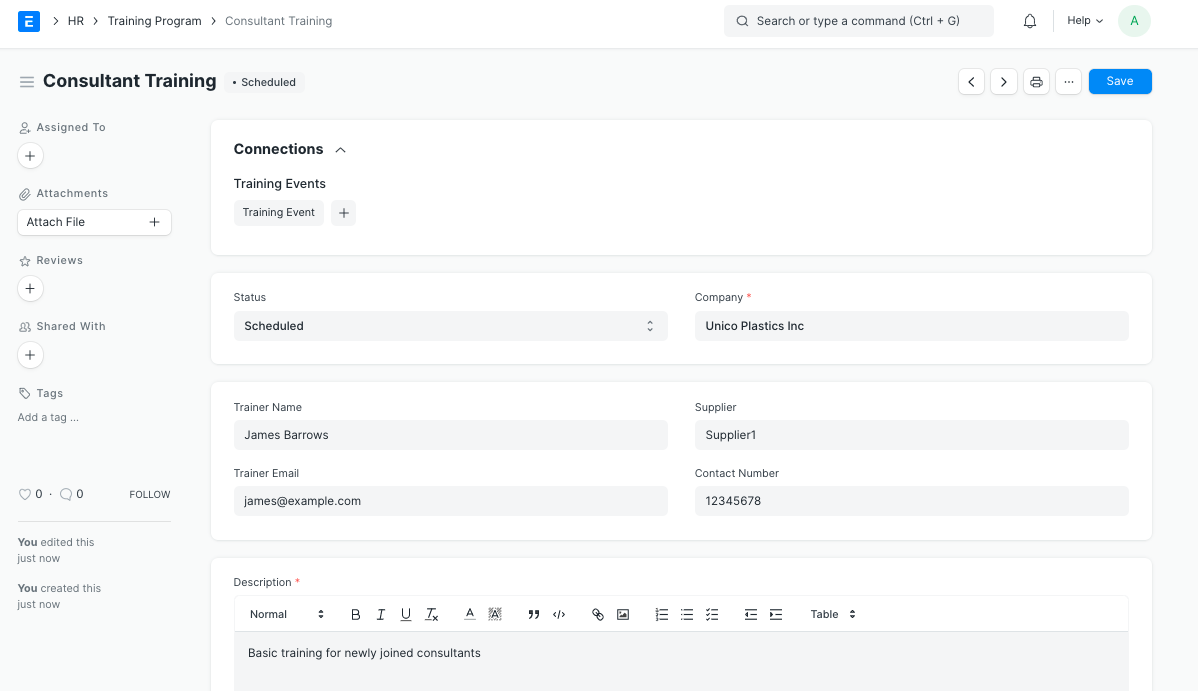
Training Program

Note: By default, the Status of the Training Program is ‘Scheduled’. However, you can change the status to ‘Completed’ or ‘Cancelled’ as per the requirement.

Once the Training Program is saved, you can create Training Events under the same.

Training Event #

Training Event allows you to schedule seminars, workshops, conferences, etc. under a Training Program.

You can also invite your employees to attend the event using this feature.

To access Training Event, go to:

Home > Human Resources > Training > Training Event

1. Prerequisites #

Before creating a Training Event, it is advisable you create the following documents:

  • Training Program
  • Employee
2. How to create a Training Event #
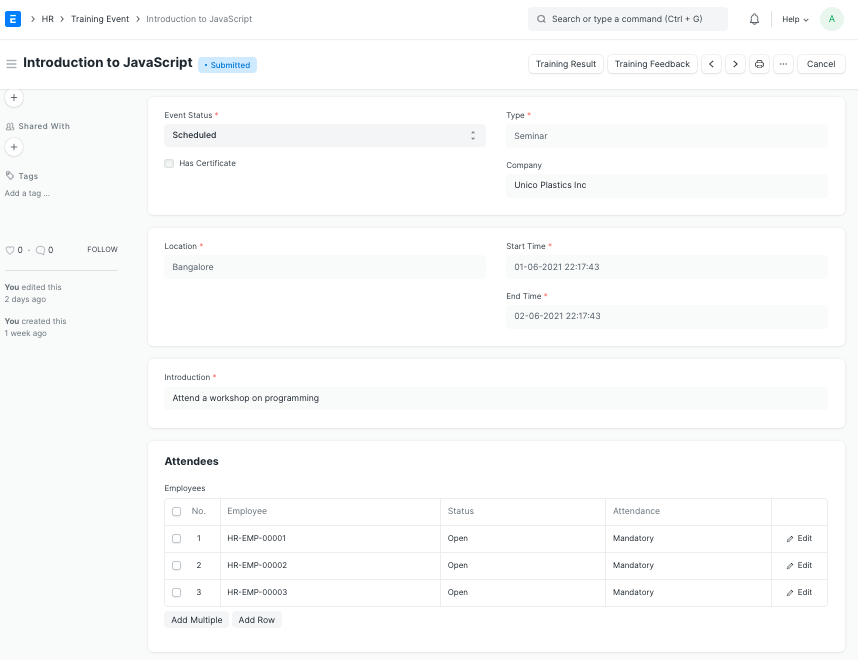
  1. Go to the Training Event list, click on New.
  2. Enter the Event Name.
  3. Select the Event Type.
  4. Select Event Level (Beginner, Intermediate, Expert).
  5. Enter the Trainer Name, Email and Contact Number.
  6. Select the Event Course. Enter the Start Time, End Time and Location of the Training Event.
  7. Additionally, you can also write a short description of the Event in the Description box.
  8. Save and Submit.
Employee

Note: Check the ‘Has Certificate’ checkbox if the Training Event is a certified course.

3. Features #
3.1 Inviting Employees for the Event #

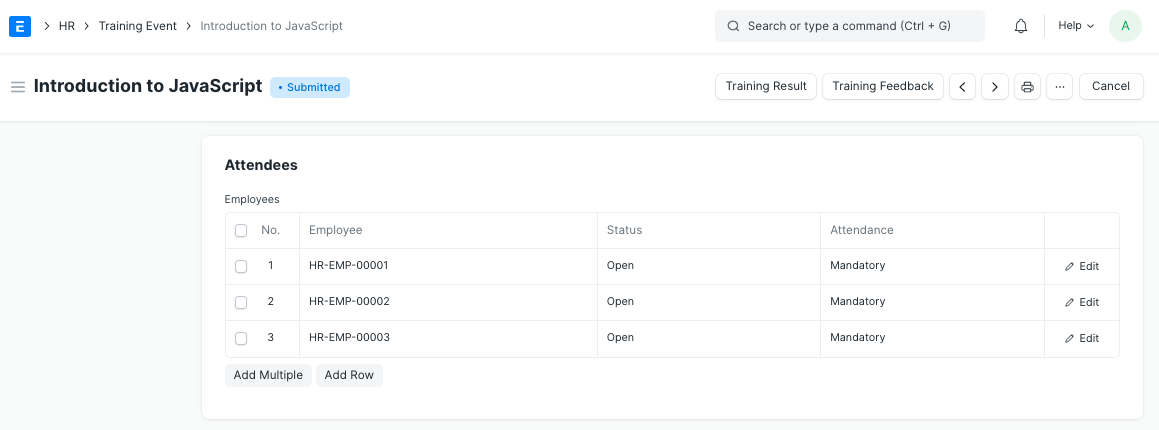
You can invite your employees to attend the Training Event. You can do so by selecting the employees to be invited in the Employees table.

By default the status of the employee will be ‘Open’.
Employee

When you submit the Training Event, a notification will be sent to the employee notifying that the Training has been scheduled. This is sent via Email Alert “Training Scheduled”. You can modify this Email Alert to customize the message.

Training Result #

After completion of the training event, employee-wise training results can be stored based on the evaluation done by the trainer.

Emeron HR allows you to create training results and share it with the employees with the Training Result doctype.

To access Training Result, go to:

Home > Human Resources > Training > Training Result

1. Prerequisites #

Before creating a Training Result, it is advisable you create the following documents:

  • Training Program
  • Training Event
  • Employee
2. How to create a Training Result #
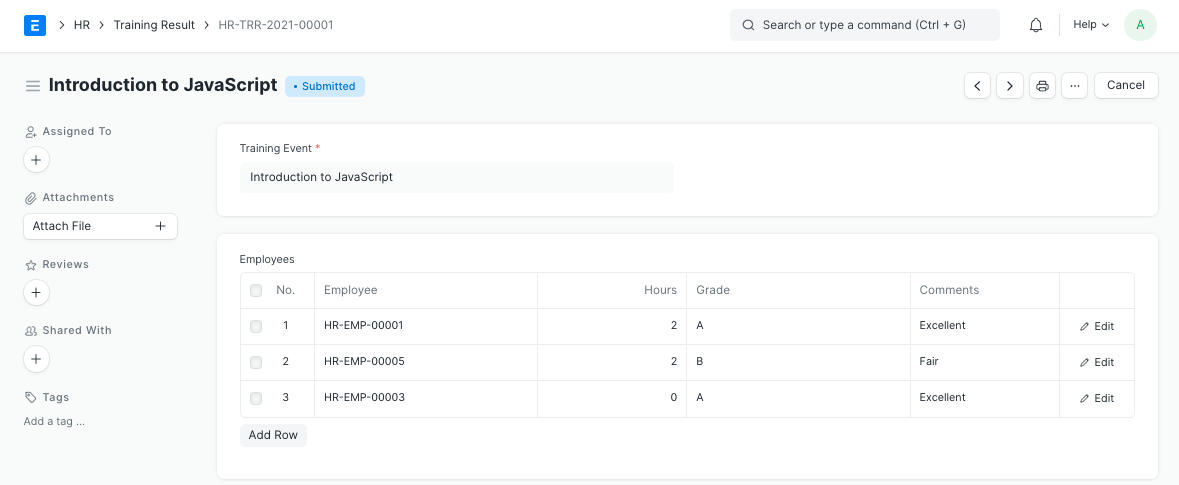
  1. Go to the Training Result list, click on New.
  2. Select Training Event.
  3. Enter the Hours, Grade and Comments against the Employee Name.
  4. Save and Submit
Employee

When the Training Result is submitted, all the employees will receive an email notifying them that they must share their feedback via Training Feedback. This is also managed via an Email Alert, so you can customize this alert too.

Note: You can also access Training Result directly from the Training Event dashboard.

Training Feedback #

Once the Training is complete, employees can share their feedback via Training Feedback.

To access Training Feedback, go to: > Human Resources > Training > Training Feedback

1. Prerequisites #

Before creating a Training Event, it is advisable you create the following documents:

  • Training Program
  • Training Event
  • Employee
2. How to create a Training Feedback #
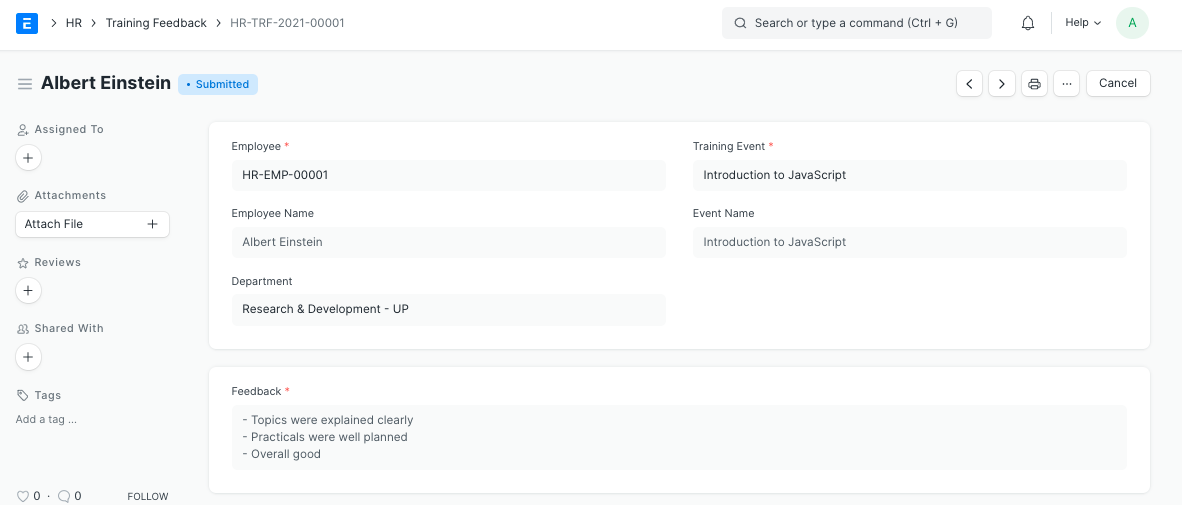
  1. Go to the Training Feedback list, click on New.
  2. Select the Employee.
  3. Select the Training Event. Based on that, the corresponding Event Name, Course and Trainer Name will get fetched.
  4. Enter the feedback in the Feedback box.
  5. Save and Submit.
Employee

Note: You can also access Training Feedback directly through the Training Event dashboard.

Still stuck? How can we help?

How can we help?

RecruitmentEmployee Lifecycle

Powered by BetterDocs

Table of Contents
  • 1. How to create a Training Program
  • Training Event
    • 1. Prerequisites
    • 2. How to create a Training Event
    • 3. Features
      • 3.1 Inviting Employees for the Event
  • Training Result
    • 1. Prerequisites
    • 2. How to create a Training Result
  • Training Feedback
    • 1. Prerequisites
    • 2. How to create a Training Feedback

Get smarter with tech! Join our newsletter for tips, trends, and solutions that save you time and money.

At Emeron Infospace, we design and deliver future‑ready digital solutions that simplify operations, accelerate growth, and create measurable impact for businesses across the GCC.

Company
  • Home
  • About
  • Services
  • Contact
Our Products
  • ERP SME
  • ERP Retail
  • ERP Services
  • ERP Garage
  • ERP Realestate
  • ERP Typing Center
  • Tailoring
  • OrderByMe Retail
Contact Us
  • Qatar
  • info@emeron.io
  • +971 55 635 1717
Facebook Twitter Youtube
  • Copyright © 2026 Emeron Infospace

Get smarter with tech! Join our newsletter for tips, trends, and solutions that save you time and money.

At Emeron Solutions, we design and deliver future‑ready digital solutions that simplify operations, accelerate growth, and create measurable impact for businesses across the GCC.

Quick Links

  • Home
  • Company
  • Services
  • Contact
  • Documentation

Services

  • ERP SME
  • ERP Retail
  • ERP Services
  • ERP Garage
  • ERP Realestate
  • ERP Typing Center
  • Tailoring
  • OrderByMe Retail
  • OrderByMe Restaurants
  • Kiosk OrderMe
  • ERP Production
  • ERP Construction
Phone

+974 70696100

Email

info@emeronsolutions.com

Address

Street 205, Building 84, Zone 56, Post box 22382 Doha

Copyright©2026 Emeron Solutions. All Rights Reserved.