
Skip to content
  • Home
  • Company
    • Overview
    • Technology
    • Key Highlights
    • Mile Stones
    • Careers
  • Service

    List One

    1

    List One

    1

    List One

    1

    List One

    1

    List One

    1

    ERP Solutions

    ERP SME

    Business Management

    ERP Retail

    POS & Inventory

    ERP Services

    Project Management

    ERP Garage

    Workshop System

    List One

    1

    List One

    1

    List One

    1

    List One

    1

    List One

    1

    ERP Real Estate

    Property Management

    ERP Typing Center

    Document Tracking

    ERP Tailoring

    Order Management

    ERP Production

    Manufacturing ERP

    List One

    1

    List One

    1

    List One

    1

    List One

    1

    List One

    1

    ERP Solutions

    OrderByMe Retail

    Smart POS

    OrderByMe Restaurant

    Digital Ordering

    Kiosk OrderByMe

    Self Ordering System

    List One

    1

    List One

    1

    List One

    1

    List One

    1

    List One

    1

    ERP Solutions

    Self Ordering System

    Customer Management

    HR & Payroll

    Employee Management

    ERP Solutions

    ERP SME

    Business Management

    ERP Retail

    POS & Inventory

    ERP Services

    Project Management

    ERP Garage

    Workshop System

    ERP Real Estate

    Property Management

    ERP Typing Center

    Document Tracking

    OrderByMe Solutions

    OrderByMe Retail

    Smart POS

    OrderByMe Restaurant

    Digital Ordering

    Kiosk OrderByMe

    Self Ordering System

    ERP Tailoring

    Order Management

    ERP Production

    Manufacturing ERP

    ERP Construction

    Project ERP

    Business System

    CRM

    Customer Management

    HR & Payroll

    Employee Management

    ERP Solutions

    ERP SME

    Business Management

    ERP Retail

    POS & Inventory

    ERP Services

    Project Management

    OrderByMe Solutions

    OrderByMe Retail

    Smart POS

    OrderByMe Restaurant

    Digital Ordering

    Kiosk OrderByMe

    Self Ordering System

    ERP Tailoring

    Order Management

    ERP Production

    Manufacturing ERP

    ERP Construction

    Project ERP

    Business System

    CRM

    Customer Management

    HR & Payroll

    Employee Management

  • Indusrties
    • Construction
    • Healthcare
    • Insurance
    • Ecommerce
    • Service Businesses
    • Retail
  • Contact
  • Resources
    • Blog
    • Documentation
Get Quoatation
  • Home
  • Company
    • Overview
    • Technology
    • Key Highlights
    • Mile Stones
    • Careers
  • Service

    List One

    1

    List One

    1

    List One

    1

    List One

    1

    List One

    1

    ERP Solutions

    ERP SME

    Business Management

    ERP Retail

    POS & Inventory

    ERP Services

    Project Management

    ERP Garage

    Workshop System

    List One

    1

    List One

    1

    List One

    1

    List One

    1

    List One

    1

    ERP Real Estate

    Property Management

    ERP Typing Center

    Document Tracking

    ERP Tailoring

    Order Management

    ERP Production

    Manufacturing ERP

    List One

    1

    List One

    1

    List One

    1

    List One

    1

    List One

    1

    ERP Solutions

    OrderByMe Retail

    Smart POS

    OrderByMe Restaurant

    Digital Ordering

    Kiosk OrderByMe

    Self Ordering System

    List One

    1

    List One

    1

    List One

    1

    List One

    1

    List One

    1

    ERP Solutions

    Self Ordering System

    Customer Management

    HR & Payroll

    Employee Management

    ERP Solutions

    ERP SME

    Business Management

    ERP Retail

    POS & Inventory

    ERP Services

    Project Management

    ERP Garage

    Workshop System

    ERP Real Estate

    Property Management

    ERP Typing Center

    Document Tracking

    OrderByMe Solutions

    OrderByMe Retail

    Smart POS

    OrderByMe Restaurant

    Digital Ordering

    Kiosk OrderByMe

    Self Ordering System

    ERP Tailoring

    Order Management

    ERP Production

    Manufacturing ERP

    ERP Construction

    Project ERP

    Business System

    CRM

    Customer Management

    HR & Payroll

    Employee Management

    ERP Solutions

    ERP SME

    Business Management

    ERP Retail

    POS & Inventory

    ERP Services

    Project Management

    OrderByMe Solutions

    OrderByMe Retail

    Smart POS

    OrderByMe Restaurant

    Digital Ordering

    Kiosk OrderByMe

    Self Ordering System

    ERP Tailoring

    Order Management

    ERP Production

    Manufacturing ERP

    ERP Construction

    Project ERP

    Business System

    CRM

    Customer Management

    HR & Payroll

    Employee Management

  • Indusrties
    • Construction
    • Healthcare
    • Insurance
    • Ecommerce
    • Service Businesses
    • Retail
  • Contact
  • Resources
    • Blog
    • Documentation
Get Quoatation

How can we help you?

Emeron ERP

20
  • Manufacturing in Emeron ERP
  • Manufacturing
  • CRM
  • Stock
  • Stock Masters
  • Accounting
  • Buying
  • Selling
  • Assets
  • Reports
  • Users and Permissions
  • Data Management
  • Setting Up
  • The Project Champion
  • Introduction
  • Why should businesses use an ERP?
  • Do I Need Emeron ERP?
  • Open Source
  • Concepts and Terms
  • Getting Started with Emeron ERP

Emeron HR

14
  • Recruitment
  • Training
  • Employee Lifecycle
  • Fleet Management
  • Salary
  • Employee Tax and Benefits
  • Overtime
  • Flexible Benefits
  • Payroll Correction
  • Arrears
  • Human Resource Setup
  • Reports
  • Emeron HR
  • Why should businesses use an ERP?

CRM

8
  • Mobile App Installation
  • Customization
  • Integrations
  • Other Features
  • Maters
  • Settings
  • Introduction
  • Emeron HR

Accounting

13
  • Purchase Invoice
  • 0verview
  • Opening and Closing
  • Accounting Masters
  • Taxes
  • Fiscal Year
  • Opening Balance in Accounts
  • Setting Up Taxes
  • Chart Of Accounts
  • Tax Category
  • Item Tax Template
  • Tax Withholding Category
  • Reports
  • Home
  • Docs
  • Emeron HR
  • Fleet Management
View Categories

Fleet Management

Fleet Management section of Human Resources helps your Organization manage their fleet of vehicles and track their expenses.

To use Fleet Management in Emeron HR, you can do the following:

  1. Set Up a Vehicle.
  2. Enter Vehicle Logs regularly.
  3. Make Expense Claims for Vehicle Expenses.
  4. View Reports for Vehicle Expenses.

Vehicle #

The Vehicle document allows you to define the different types of Vehicles in your Organization. It acts as the Vehicle Master for Fleet Management.

To access the Vehicle master, go to:

Human Resources > Fleet Management > Vehicle

1. How to create a Vehicle document #
  1. Go to Vehicle list, click on New.
  2. Enter information such as License Plate, Make (Brand) and Model.
  3. Enter Odometer value (Last).
  4. Enter other additional details such as Fuel Type ad Fuel UOM.
  5. Save.
Vehicle
2. Features #

Apart from the aforementioned mandatory features, some additional features that can be captured in the Vehicle master are as follows:

2.1 Additional Vehicle Details #

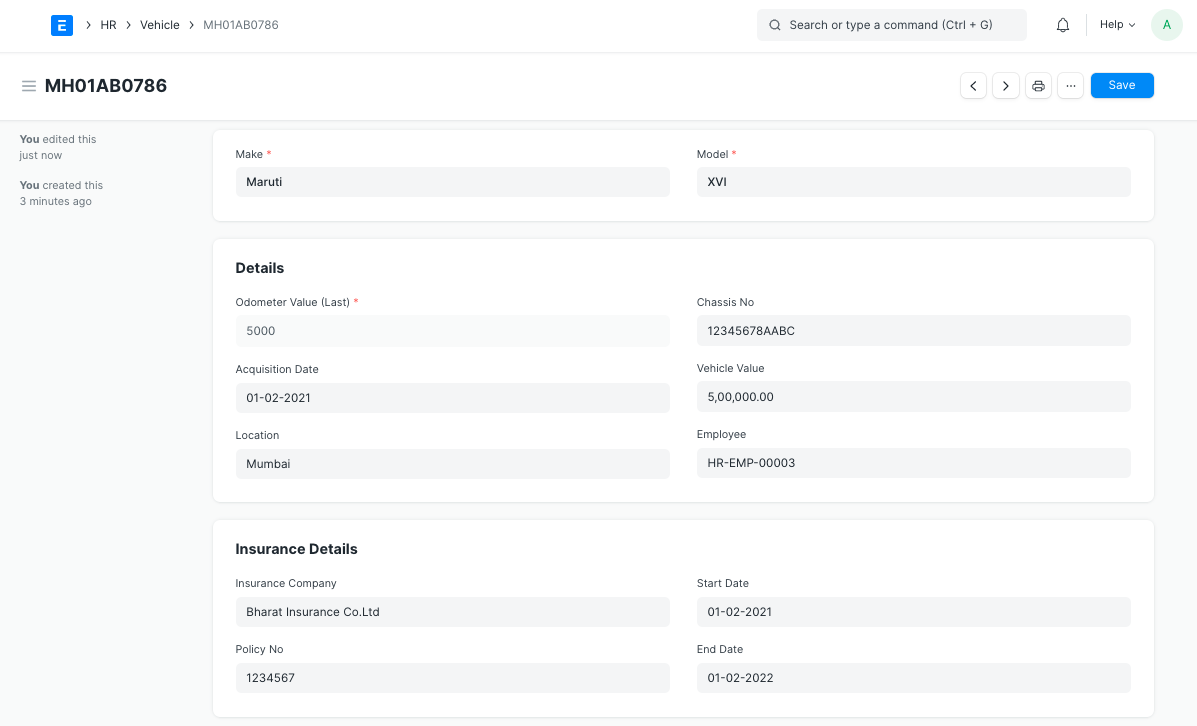
Additional Vehicle details such as Chassis No., Acquisition Date, Vehicle Value (Amount), Location, Employee managing the Vehicle and Insurance details can be captured in the Vehicle master.
Vehicle
2.2 Vehicle Attributes #

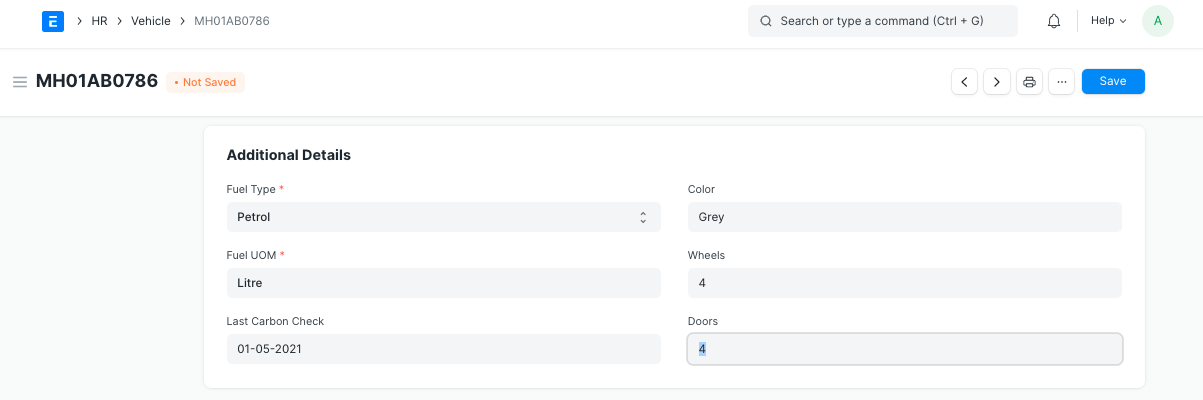
Additionally, Vehicle attributes like Color, Wheels, Door, Last Carbon Check, Fuel Type and UOM can be saved in the Vehicle master.
Vehicle

Vehicle Log #

Vehicle Log is used to enter Odometer readings, Fuel Expenses and Service Expense details.

To access Vehicle Log, go to:

Human Resources > Fleet Management > Vehicle Log

1. Prerequisites #

Before creating a Vehicle Log, it is necessary that you create the following documents:

  • Vehicle
2. How to create a Vehicle Log #
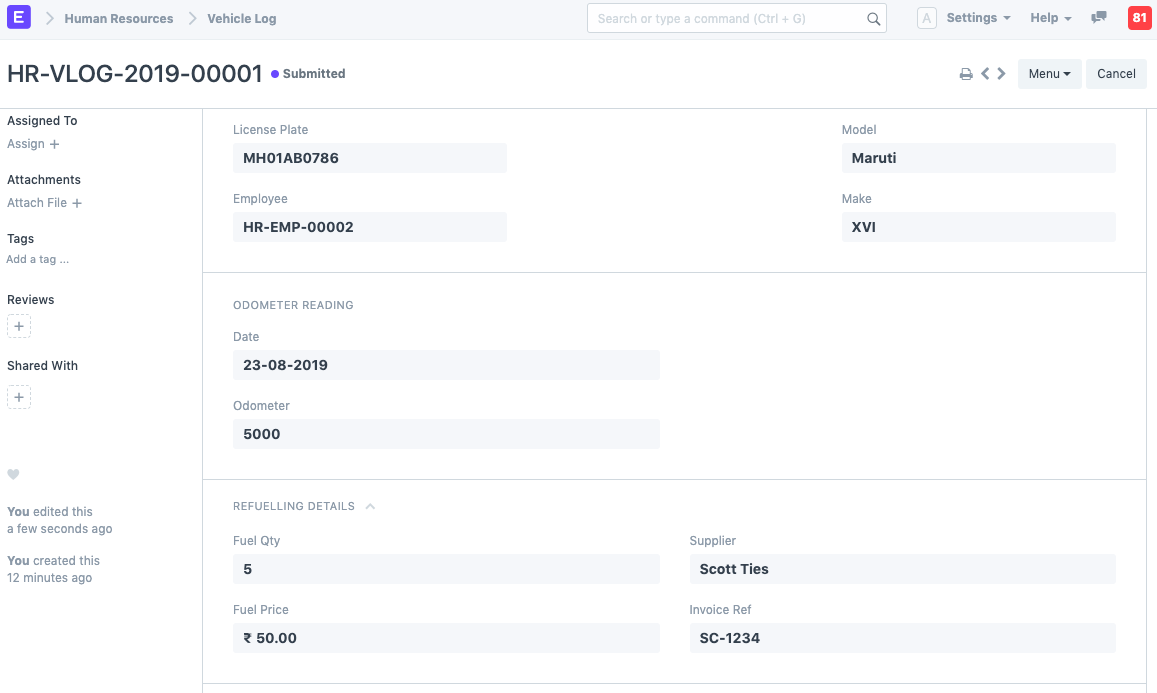
  1. Go to Vehicle Log list, click on New.
  2. Select License Plate and Employee.
  3. Enter Odometer Reading information such as Date and Odometer (reading).
  4. Enter Refueling Details [optional] such as Fuel Qty, Fuel Price, Supplier and Invoice Ref.
Vehicle Log5. Additionally, Vehicle Service Details can also be added as shown (optional).
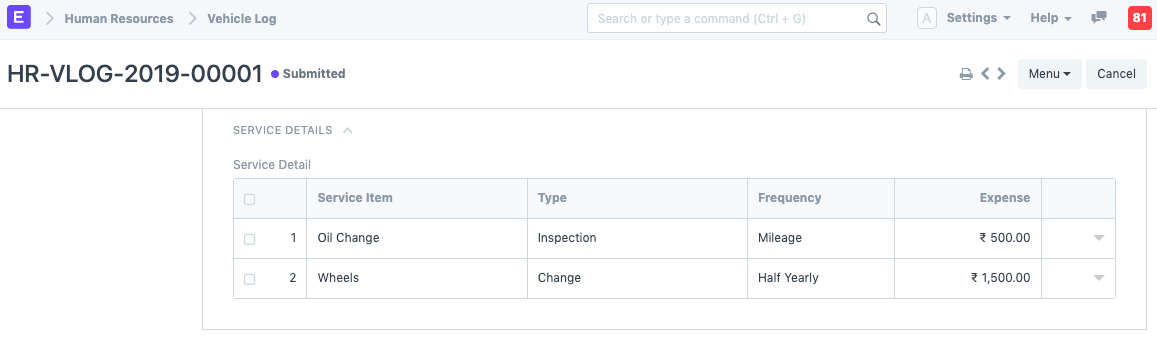
Vehicle Log6. Save. Once the information is saved, the Model and Make values will be automatically fetched.

3. Features #

Fleet Management in Emeron HR allows you to automatically create an Expense Claim against your Vehicle Expenses.

3.1 Make Expense Claim against Vehicle Expenses #

Click on Make Expense Claim button. This button appears only in case of Submitted Vehicle Logs.
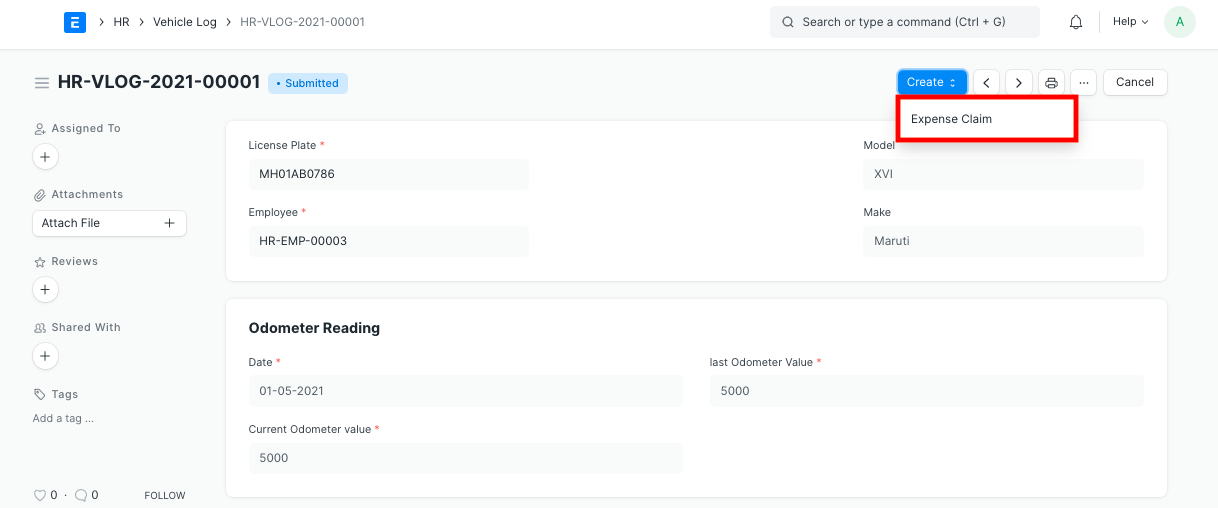
Expense Claim Button

When you click on ‘Make Expense Claim’,

  1. The Date, Employee, Expense total are fetched over to the created Expense Claim.
  2. The sum of Fuel Expenses and Service Expenses is calculated and fetched over to Expense Claim Amount.
  3. Employee can submit the Expense Claim for further processing.
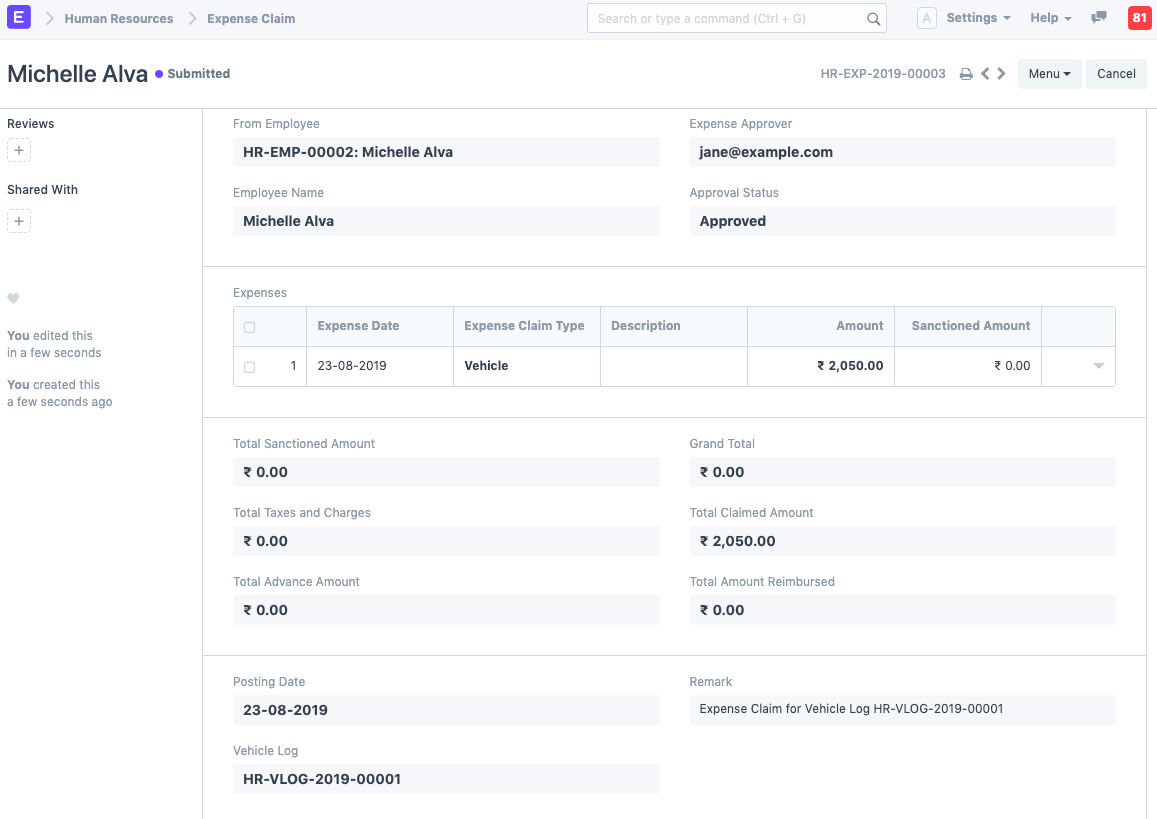
Vehicle Log

Still stuck? How can we help?

How can we help?

Employee LifecycleSalary

Powered by BetterDocs

Table of Contents
  • Vehicle
    • 1. How to create a Vehicle document
      • 2. Features
      • 2.1 Additional Vehicle Details
      • 2.2 Vehicle Attributes
  • Vehicle Log
    • 1. Prerequisites
    • 2. How to create a Vehicle Log
    • 3. Features
      • 3.1 Make Expense Claim against Vehicle Expenses

Get smarter with tech! Join our newsletter for tips, trends, and solutions that save you time and money.

At Emeron Infospace, we design and deliver future‑ready digital solutions that simplify operations, accelerate growth, and create measurable impact for businesses across the GCC.

Company
  • Home
  • About
  • Services
  • Contact
Our Products
  • ERP SME
  • ERP Retail
  • ERP Services
  • ERP Garage
  • ERP Realestate
  • ERP Typing Center
  • Tailoring
  • OrderByMe Retail
Contact Us
  • Qatar
  • info@emeron.io
  • +971 55 635 1717
Facebook Twitter Youtube
  • Copyright © 2026 Emeron Infospace

Get smarter with tech! Join our newsletter for tips, trends, and solutions that save you time and money.

At Emeron Solutions, we design and deliver future‑ready digital solutions that simplify operations, accelerate growth, and create measurable impact for businesses across the GCC.

Quick Links

  • Home
  • Company
  • Services
  • Contact
  • Documentation

Services

  • ERP SME
  • ERP Retail
  • ERP Services
  • ERP Garage
  • ERP Realestate
  • ERP Typing Center
  • Tailoring
  • OrderByMe Retail
  • OrderByMe Restaurants
  • Kiosk OrderMe
  • ERP Production
  • ERP Construction
Phone

+974 70696100

Email

info@emeronsolutions.com

Address

Street 205, Building 84, Zone 56, Post box 22382 Doha

Copyright©2026 Emeron Solutions. All Rights Reserved.